
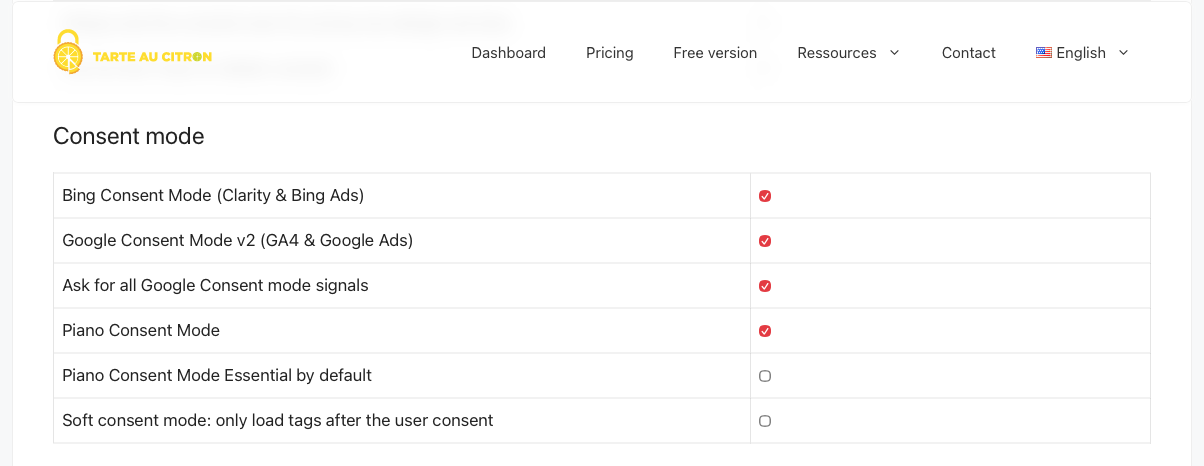
TL;DR – Google consent mode v2 is the API that passes user consent choices to Google Ads and GA4 tags. Since March 2024, it’s mandatory for any site targeting the EEA, or you risk losing conversion tracking and remarketing. It adds two new parameters (
ad_user_dataandad_personalization) on top of the two original ones (ad_storageandanalytics_storage). With tarteaucitron.js (the free open-source version), one option is all it takes to enable it:"googleConsentMode": true.
What Is Consent Mode v2?
Google consent mode is a mechanism Google built to bridge the gap between a site’s cookie banner and its measurement tags. In practice: when a user declines cookies, the tags don’t go completely dark – they send anonymous signals (called “pings”) that let Google model a portion of the missing data.
Without consent mode, it’s binary: consent = data, refusal = total silence. With consent mode, Google can estimate unobserved conversions using its statistical models, as long as it receives those signals.
Version 2, rolled out in late 2023 and made mandatory in March 2024, reinforces this logic by adding two advertising-specific parameters required by the European Digital Markets Act (DMA).
The 4 parameters in consent mode v2:
|
Parameter |
Role |
|---|---|
|
|
Advertising cookie storage (GCLID, etc.) |
|
|
Analytics cookie storage (GA4) |
|
|
Sending user data to Google for advertising purposes |
|
|
Personalised advertising / remarketing |
The first two existed in v1. The last two are new in v2 – their absence is what makes an implementation non-compliant.
Consent Mode v1 vs v2: What Changed
V1 worked with two parameters. That was enough for GDPR in its original reading, but the DMA changed the game.
The 2 New Parameters (ad_user_data, ad_personalization)
ad_user_data controls whether the site allows user data to be sent to Google for advertising purposes. This covers enhanced conversions in particular – if this parameter is denied, Google can’t receive hashed data (email, phone number) for conversion matching.
ad_personalization controls personalised advertising and remarketing. If a user declines this signal, Google can no longer serve them ads based on their browsing behaviour. This is the parameter directly tied to remarketing lists.
One important point: if ad_personalization conflicts with allow_ad_personalization_signals, the more restrictive value wins. Google clarified this in its official documentation.
Why Google made v2 Mandatory from March 2024
The Digital Markets Act (DMA) came into force on 6 March 2024. It requires “gatekeepers” – Google included – to collect explicit, granular consent before any data processing for advertising purposes in the EEA.
For Google, this translated into a concrete obligation: advertisers and publishers using Google Ads or GA4 in the EEA must implement google consent mode v2 with a correcly configured CMP. Without it, Google Ads progressively restricted conversion tracking and remarketing for European traffic.
The deadline was 6 March 2024. Sites that hadn’t migrated from v1 (or had no consent mode at all) started seeing data loss in their Google Ads and GA4 reports.
Basic Mode vs Advanced Mode: Which Should You Choose?
This is the question everyone asks. The answer depends on your priority: maximum privacy or maximum measurement.
Basic mode – Google tags don’t load at all until the user has made a choice. No data is sent to Google before consent. It’s the strictest mode from a privacy standpoint, but Google’s behavioural modelling is more limited, since it has no signal at all for users who decline.
Advanced mode – tags load as soon as the page opens, but in a restricted state. On refusal, they send anonymous cookieless pings. Google can then use those signals to feed its statistical models and estimate missing conversions or sessions.
Summary table:
|
Criterion |
Basic |
Advanced |
|---|---|---|
|
Tags load before consent |
❌ No |
✅ Yes (restricted mode) |
|
Data sent on refusal |
❌ None |
✅ Anonymous pings |
|
Google modelling quality |
Limited |
Better |
|
Privacy level |
Maximum |
High |
|
Recommended for |
Sensitive sites (health, etc.) |
Most e-commerce / media sites |
My recommendation: for the vast majority of sites using Google Ads or GA4, Advanced mode is the right trade-off. It respects consent while preserving usable measurement. Basic mode suits sites handling sensitive data or serving an audience that’s particularly privacy-conscious.
The softConsentMode Option: For Privacy-First Sites
softConsentMode is a tarteaucitron.js option that goes even further than standard Basic mode. It’s enabled with a single line in the init:
tarteaucitron.init({
    // ... your other parameters ...
    "googleConsentMode": true,
    "softConsentMode": true,  // ← enables maximum privacy mode
});
Behaviour:
-
User accepts →
grantedsignals are sent normally. GA4 and Google Ads receive all data and modelling runs at full capacity. -
User declines → no signal is sent and everything is blocked. No anonymous pings, no tags loading in restricted mode. Total silence.
That’s the key difference from standard Advanced mode: in regular Advanced, a refusal still generates anonymous pings to Google to feed its modelling. With softConsentMode, a refusal = zero data transmitted, full stop.
Who is it for? This mode is designed for sites that want to go beyond the minimum legal requirements: health sites, platforms aimed at children, or any publisher whose audience is particularly sensitive about privacy. The upside: when a user accepts, Google’s modelling works normally – you’re not sacrificing measurement for consenting users, you’re simply protecting those who decline more thoroughly.
Integrating Consent Mode v2 with tarteaucitron.js
tarteaucitron.js is the free, open-source version of the consent manager. It’s distinct from tarteaucitron.io, which is the commercial Pro version (from €190/year). This guide covers tarteaucitron.js exclusively.
Good news: consent mode v2 support is built natively into tarteaucitron.js. No custom GTM code needed, no third-party template.
With tarteaucitron.io Pro: Automatic Activation
tarteaucitron.io (the commercial Pro version, distinct from the open-source tarteaucitron.js) handles Consent Mode v2 in a fully transparent way: no googleConsentMode parameter to add, no manual configuration.
Concretely: if automatic mode is enabled in your tarteaucitron.io dashboard and GA4 or Google Ads is detected on the site, Consent Mode v2 activates on its own. All 4 signals are initialised to denied by default, then updated based on the user’s choices – without you touching a single line of code.
This is one of the concrete advantages of the Pro version over the open-source one: Consent Mode v2 compliance is guaranteed out of the box, with no technical maintenance on your end. For agencies managing multiple sites, or publishers without developer resources, that’s a significant time saving.
Prerequisites
Before you start, check these three things:
-
tarteaucitron.js is up to date – consent mode v2 support was added in recent versions. Check on GitHub that you’re running the latest release.
-
Google tags are managed through tarteaucitron – if you’re loading GA4 or Google Ads directly in the
<head>without going through tarteaucitron, consent signals won’t be correctly passed. Let tarteaucitron handle the loading of those services. -
No duplicates – if you also use GTM, avoid loading Google tags both via GTM and via tarteaucitron. Pick one or the other to prevent signal conflicts.
Step-by-Step Configuration
Enabling consent mode v2 in tarteaucitron.js is done through the googleConsentMode parameter inside the tarteaucitron.init() function.
Here’s a complete, commented configuration:
<!-- 1. Load tarteaucitron.js -->
<script src="/tarteaucitron/tarteaucitron.js"></script>

<script>
tarteaucitron.init({
    "privacyUrl": "/privacy-policy/", /* URL of your privacy policy */
    "hashtag": "#tarteaucitron",
    "cookieName": "tarteaucitron",

    "orientation": "middle",       /* Banner position: top, bottom, middle, popup */
    "groupServices": false,
    "serviceDefaultState": "wait", /* "wait" = no auto-loading before user choice */

    "showAlertSmall": false,
    "cookieslist": false,

    "showIcon": true,
    "iconPosition": "BottomRight",

    "DenyAllCta": true,            /* Show the "Deny all" button */
    "AcceptAllCta": true,
    "highPrivacy": true,           /* RECOMMENDED: disables implied consent */

    "removeCredit": false,
    "moreInfoLink": true,

    "mandatory": true,             /* Shows a message about necessary cookies */
    "mandatoryCta": true,

    /* ✅ Enables Google Consent Mode v2 for Google Ads and GA4 */
    "googleConsentMode": true,

    "bingConsentMode": true,       /* Optional: Bing Ads / Clarity */
});
</script>

<!-- 2. Add your Google services AFTER the init -->
<script>
    // Example: Google Analytics 4
    tarteaucitron.user.gtagUa = 'G-XXXXXXXXXX';
    tarteaucitron.user.gtagCrossdomain = [];
    (tarteaucitron.job = tarteaucitron.job || []).push('gtag');
</script>
What "googleConsentMode": true does: tarteaucitron.js automatically sends all 4 signals (ad_storage, analytics_storage, ad_user_data, ad_personalization) to Google based on the user’s choices. By default, all parameters are initialised to denied before any interaction – which is the behaviour Google expects.
⚠️ Don’t disable
googleConsentModeif you have active Google services in tarteaucitron. Without this parameter, consent signals aren’t transmitted and your implementation isn’t v2-compliant.
Verifying Your Implementation
Once deployed, verify everything is working with Google Tag Assistant (Google’s official debug tool):
-
Open tagassistant.google.com and enter your site’s URL.
-
Start a debug session and browse your site.
-
In the Summary panel, select the first Consent event.
-
Check that all 4 parameters are present and set to
deniedin the On-page Default column. -
Accept cookies on your banner, then check the last Consent event: the parameters should switch to
granted. -
Also test the full refusal scenario: all 4 parameters should stay
denied.
If all 4 signals appear correctly in both scenarios, your consent mode v2 implementation is compliant.
Impact on Google Ads and Google Analytics 4
This is the real business question behind all the technical mechanics.
Without consent mode v2, users who decline cookies disappear entirely from your reports. For a site with a 40% refusal rate – a common figure – that’s a massive measurement gap. Google Ads underestimates conversions, automated bidding optimises on incomplete data, and remarketing loses a chunk of its audience.
With consent mode v2 in Advanced mode, Google uses the anonymous pings to feed its conversion modeling in Google Ads and behavioural modelling in GA4. In practice:
-
In Google Ads, modelled conversions appear in the “Conversions” column with a note in the reports. They allow automated bidding strategies (tROAS, tCPA) to optimise against a more complete picture.
-
In GA4, behavioural modelling reconstructs sessions and events for users who declined. It activates automatically when conditions are met (sufficient volume, consent mode correctly configured).
What consent mode v2 does not do: it doesn’t bypass consent. If a user declines, their actual data isn’t collected. Modelling is a statistical estimate, not disguised tracking.
On ad_user_data: this parameter is especially important if you use enhanced conversions in Google Ads. Without this signal being granted, Google can’t receive hashed data for conversion matching – which significantly reduces the accuracy of offline conversion tracking and lead-based conversions.
FAQ: Google Consent Mode v2
Is consent mode v2 mandatory for my site?
If you use Google Ads or GA4 and target users in the EEA (European Union + Iceland, Liechtenstein, Norway), yes. Since March 2024, Google requires google consent mode v2 to maintain conversion tracking and remarketing for that traffic. If your site is 100% outside the EEA, you’re not directly affected by the DMA deadline – but implementing it is still a GDPR best practice.
What’s the difference between Basic mode and Advanced mode?
In Basic mode, Google tags don’t load before consent – no data is sent to Google before the user makes a choice. In Advanced mode, tags load immediately but in a restricted state: they send anonymous cookieless pings on refusal, which lets Google model the missing data. Advanced mode gives better measurement quality; Basic mode offers maximum privacy.
Is my v1 implementation still valid?
No. V1 only handles ad_storage and analytics_storage. It doesn’t pass ad_user_data and ad_personalization, the two parameters required by the DMA since March 2024. If you’re still on v1, you need to migrate – with tarteaucitron.js, it’s simply a library update and adding "googleConsentMode": true.
Is it compatible with Google Tag Manager?
Yes, but with a caveat. If you use GTM to load your Google tags, you can configure tarteaucitron.js to send consent signals before the GTM container loads. Order is critical: consent signals must be set before GTM loads the tags. Avoid duplicating Google services (once via GTM, once via tarteaucitron) – pick a single loading channel.
Will consent mode v2 cause my reported conversions to drop?
Not necessarily. If you’re migrating from a situation with no consent mode, you’ll likely see an initial drop in “directly observed” conversions – but modelled conversions will compensate for some of that. If you’re migrating from v1, the impact is generally limited. What matters is that measurement becomes more reliable and automated bidding strategies have better-quality signals to work with.
Does tarteaucitron.js automatically handle all 4 v2 signals?
Yes. With "googleConsentMode": true, tarteaucitron.js initialises all 4 parameters to denied by default, then updates them (granted or denied) based on the user’s choices for each active Google service. You don’t need to manually write gtag('consent', 'default', ...) or gtag('consent', 'update', ...) calls yourself.